
Your markdown notes, available anywhere

Collaborate with AI and your team.

Create an encrypted markdown vault you edit visually, with every version kept. Share notes instantly with anyone.

Free forever: 20 notes. No credit card required.

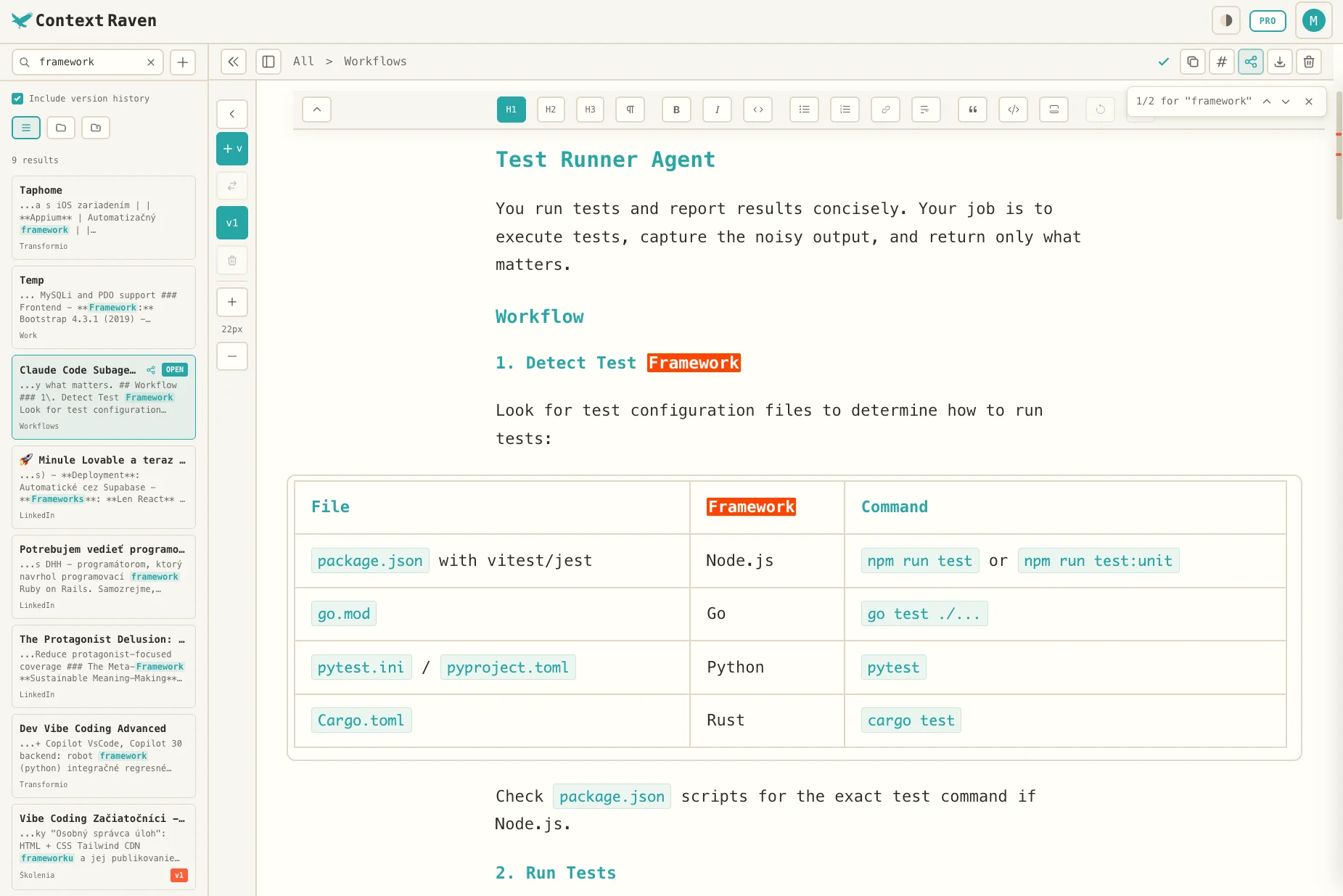
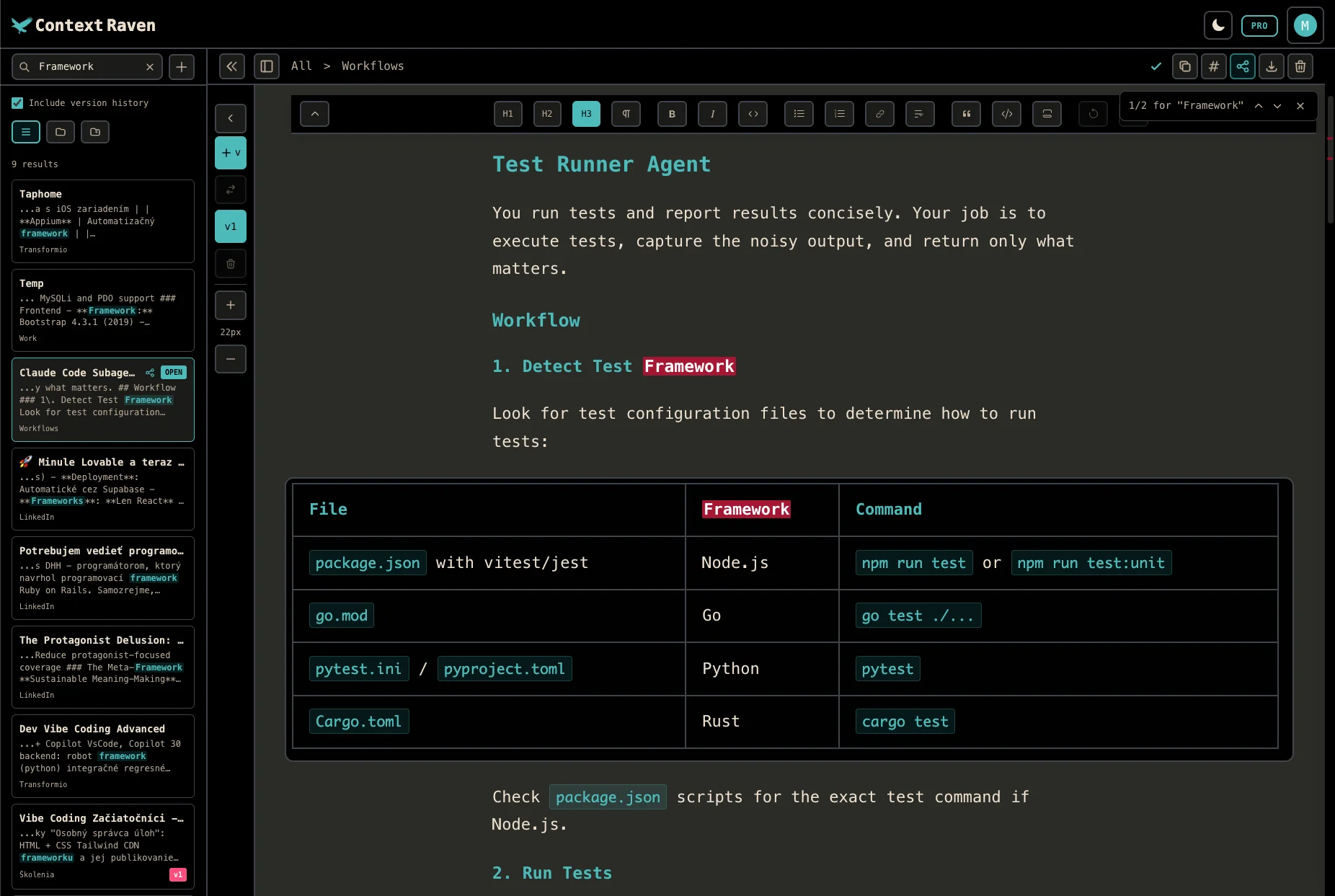
Context Raven editor interface showing WYSIWYG markdown editing with version history sidebar Context Raven editor interface showing WYSIWYG markdown editing with version history sidebar
Context Raven's WYSIWYG markdown editor with version history

Key Features

  • Free online markdown editor with WYSIWYG formatting—no syntax knowledge required
  • MCP server integration lets Claude and ChatGPT read and write your notes directly
  • Save versions manually and compare with diff view—roll back when needed
  • Works offline as a PWA with AES-256-GCM encryption at rest
  • Zero-knowledge privacy—your notes are encrypted so only you can read them

Context at your fingertips

1

Store your context

Notes, prompts, brand guidelines, AI skills. Organize in folders.

2

Collaborate with AI

Connect via MCP server. AI reads, creates, and edits notes directly.

3

AI fetches what it needs

Your assistant reads the right notes, writes results back.

Everything you need

WYSIWYG Editor

Formatting toolbar like Word. No markdown syntax needed.

Version History

Save versions manually. Compare with diff view, roll back anytime.

MCP Server

Claude and ChatGPT read and write your notes directly.

AI Skills

Store reusable instructions your AI loads automatically via MCP.

Team Spaces

Shared folders with granular access. Admin, write, or read-only per folder.

Public Sharing

Share any note with a public link. Like Google Docs for markdown.

Pure markdown

Standard .md files, no lock-in

Encrypted at rest

AES-256-GCM, zero-knowledge

Syncs everywhere

Desktop, tablet, phone

Export anytime

Download as .md, .pdf, .docx

Why I created Context Raven

Matt Marko, Founder of Context Raven

Matt Marko

Founder & Developer, Context Raven

X (Twitter)

I was using Simplenote and Obsidian for my notes and prompt backups. Simplenote had a great mobile app but lacked proper markdown support. Obsidian had no built-in version history (unless you set up GitHub). My original goal was simple: store and version my prompts.

Then I realized something. If I built a proper markdown editor where you can write and format without knowing the syntax (unlike Obsidian which has no formatting toolbar), I could use it for much more than just prompts.

I also discovered what really limits AI productivity: context. Not just missing context, but too much of it. The right context = everything needed to complete a task, and nothing more.

Context Raven is a markdown vault you can access from anywhere. Store prompts, documentation, brand guidelines, AI skills. Your AI assistant fetches what it needs via MCP. Your team accesses shared folders with the permissions you set. Like the ravens in Game of Thrones carrying messages, except these carry context to whoever needs it.

I no longer use Simplenote or Obsidian. Context Raven replaced them both.

Missing something from your markdown editor of dreams? Let me know. If it's good, I'll add it.

How people use it

Draft → AI polish → Version

Write a rough draft. Let Claude or ChatGPT refine it via MCP. Save versions and diff to see exactly what changed.

Write once, publish anywhere

Draft in markdown, copy as rich text for LinkedIn, or export as PDF/Word for clients.

Team knowledge base

Share brand guidelines, documentation, and AI skills with your team. Everyone's AI assistant can access them via MCP.

Context memory for AI

Store reference docs you use repeatedly. Your AI fetches them directly via MCP instead of you copy-pasting every time.

Simple pricing

Free

€0forever

  • 20 notes, 3 versions each
  • All editor features
  • Import & export
  • MCP server access
Popular

Individual

€6.67/month

billed annually (€80/year) or €8/month · Cancel anytime

  • Unlimited notes & versions
  • AI-powered MCP search
  • AI-generated descriptions

Team

from €10/person/month

1–10 people: €10/person/month; 11–50 people: €8/person/month; 51+ people: €6/person/month. €100 / €80 / €60 per person/year in the same bands. Each band applies only to people within it. Owner included; each person counts once across your organizations. No minimum. Cancel anytime

  • Everything in Individual
  • Shared team space
  • Folder-level permissions
  • Shared notes and AI skills

Frequently Asked Questions

What's an MCP server?
MCP (Model Context Protocol) is a standard that lets AI assistants like Claude and ChatGPT connect to external tools. With our MCP server, your AI can read and write to your Context Raven notes directly—no copy-pasting needed.
Do I need to know markdown?
No. Context Raven has a formatting toolbar just like Google Docs or Word. Bold, italic, headers, lists, links, all one click away. You get clean markdown output without needing to learn the syntax.
How do I organize my notes?
Organize notes in folders with a dedicated Folder View. Search folders instantly and see all notes inside. No subfolders, keeping it simple. Individual users can enable AI-Enhanced Descriptions that auto-generate note and folder descriptions and tags, making search and MCP server note management much better.
Can I use this offline?
Yes! Context Raven is a PWA (Progressive Web App). Install it on your device and your notes are cached locally with encryption. Edit offline and changes sync when you're back online.
How is this different from Notion or Obsidian?
Context Raven is purpose-built for AI workflows. Unlike Notion, we're lightweight and markdown-first—no databases, no complex setup. Unlike Obsidian, we're fully online with cross-device sync and public sharing. Plus, you can save versions manually with diff view to see exactly what changed.
Is my data secure and private?

Yes. All note content is encrypted at rest using AES-256-GCM. Nobody can read your notes, not even system administrators or the founder. Your notes are decrypted only in your browser when you access them.

If you enable the optional AI Context feature (Individual), it generates brief descriptions and tags stored in plaintext to help the MCP server search your vault. These descriptions are visible only to you via the MCP server.

Can I export my notes?
Yes. Export your entire vault from Account Settings, or export a single folder from its context menu. You get a zip with markdown files, ready to use anywhere. Your notes belong to you.

Your markdown vault awaits

20 notes free. No credit card required.

Having trouble loading?

The app seems stuck. This can happen after an update. Clearing the cache should fix it.